Sponge Art: Shape Puzzle
- 4.5
- Rating
- 50.00M
- Installs
- Free
- Price
 Analysis by App-foxy
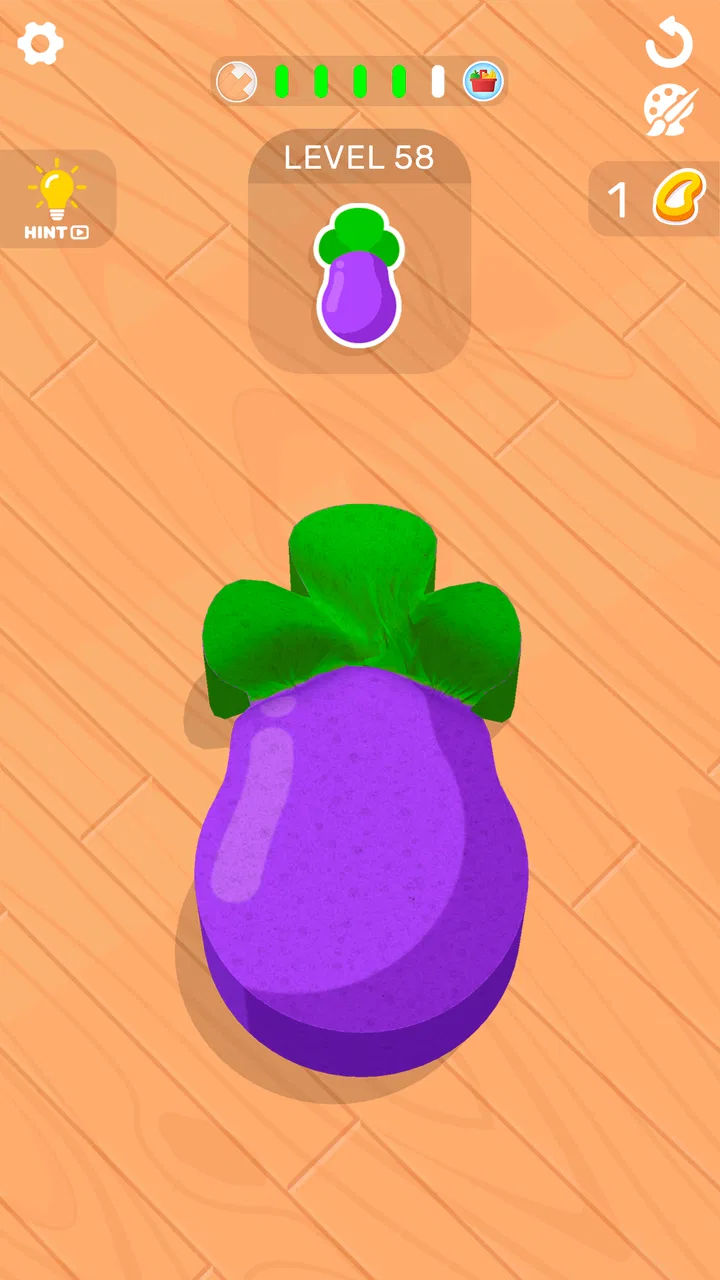
I spent time with Sponge Art: Shape Puzzle as a light, tactile puzzle game, and its appeal became clear almost immediately: each level asks me to turn an ordinary sponge shape into a recognizable object by placing rubber bands in the right positions. It is simple to understand, but the satisfaction comes from working out the order and placement rather than from racing against a clock. That makes it a comfortable choice when I want something playful without committing to a long session.
Developed by CASUAL AZUR GAMES, this free puzzle game is aimed at Everyone and is available for Android devices running version 7.0 or later. It has reached over 50 million installs and holds a 4.6 average from around 244 thousand ratings, which fits my impression that it is designed for broad, casual play rather than a narrow audience of expert puzzle fans.
How Sponge Art feels in everyday play
The basic interaction is wonderfully direct. I look at the loose sponge, choose a rubber band, and place it so the material folds or stretches into the intended picture. There is no need to learn a complicated control scheme. The challenge is visual: I have to notice which part should be pulled first, which band will create the main outline, and whether a small adjustment will make the final shape look right.
You May Also Like

 Blood Strike: 2.5 Anniversary
Blood Strike’s Loadouts Turn Every Drop Into a Tactical Gamble
A close look at Blood Strike’s custom loadouts: how fast access to signature weapons reshapes its battle royale rhythm, rewards preparation, and narrows the gap between fights.

 Pandora - Music & Podcasts
Pandora’s Music Is Easy to Start, but Harder to Recover
Pandora’s strength is its low-effort path from a seed to a station. Its weak spot is how much confidence it asks you to place in connection, setup, and quiet recovery.

 8 Ball Pool
 Is Built on Rivalries, Rematches, and Routine
A close look at the rivalries, rematches, shared routines, and unanswered safety questions that turn a quick pool match into a persistent mobile community.

 Samsung Music
’s Quiet Strength Is Playing What You Already Own
Its reach comes less from spectacle than from dependable access to a personal library. That simplicity is both the app’s strongest retention engine and its ceiling.

 AccuWeather: Weather Radar
AccuWeather Review: A Quick, Clear Forecast for Everyday Decisions
For everyday plans, the best forecast is the one you can understand quickly. AccuWeather makes rain timing, radar, and local conditions easy to act on, with a few trade-offs.

 Hill Climb Racing
Why Hill Climb Racing Still Turns Crashes Into One More Run
A tiny car, a bumpy hill and one more upgrade: Hill Climb Racing keeps resurfacing because its simple chaos makes every near-miss feel personal.
More From Our News Desk



That simplicity makes the game especially suitable for short breaks. I can play a few puzzles while waiting for an appointment, during a commute, or at the end of the day when I want something more active than scrolling but less demanding than a strategy game. A level usually feels like a compact visual problem, so I do not need to remember a large story or keep a complicated plan in my head between sessions.
The best part is the transformation itself. At the beginning, the sponge looks like a soft, unfinished object. After the bands are positioned, the shape gradually becomes an item, animal, or symbol that is easier to recognize. That reveal gives every small action a purpose. I am not simply matching colors or clearing tiles; I am building a picture with a limited set of physical-looking moves.
Still, the game is not a traditional logic puzzle in the strictest sense. A player looking for deep deduction, elaborate rules, or several equally valid solutions may find it lightweight. Its pleasure comes from visual arrangement and quick completion. I would recommend it to someone who enjoys satisfying object transformations, but I would not present it as a substitute for a demanding brain-training title.
Why the controls work well
The rubber-band idea gives the controls a natural connection to the puzzle. Dragging or placing a band feels more meaningful than tapping a generic button because the action appears to change the sponge directly. I found that this made mistakes easy to understand: if the shape looked wrong, I could usually identify which band was causing the problem instead of feeling lost in an abstract interface.
A useful habit is to study the whole outline before making the first move. I get better results when I identify the largest feature of the target first and then work toward smaller details. Starting with a tiny section can make the later bands awkward, while establishing the main structure early often leaves a clearer path for the finishing touches.
Another practical tip is to avoid treating every band as equally important. Some placements define the silhouette, while others only refine it. When I focus on the bands that change the overall shape, the puzzle becomes less like trial and error and more like a sequence of visual priorities. This is one of the small insights that is easy to miss if I rush through the opening levels.
Speed, pauses, and the rhythm of a session
My impression of the game is that it is built around quick decisions rather than long calculations. The interaction feels brisk when I already understand the target, and the pace slows naturally when I need to inspect how the sponge should fold. That balance works well for casual play because the game does not force every moment to have the same intensity.
It also handles the kind of interrupted play that mobile games often need. I can stop after a puzzle instead of searching for a convenient checkpoint in a long campaign. For a user who plays in small gaps, that matters more than a large collection of advanced systems. The game’s compact structure makes it easy to pick up, solve something, and put the phone away.
The trade-off is that players who want a constant sense of acceleration may find the experience too gentle. There is no appeal here for someone whose favorite puzzle games depend on timers, rapid chains, or increasingly frantic input. The relaxed pace is a strength for casual users, but it can feel modest if I am specifically seeking pressure.
When I play for longer, the repeated pattern becomes more noticeable: inspect the shape, place bands, correct the arrangement, and complete the design. The visual theme keeps that loop pleasant, but it does not completely hide its repetition. I think the game works best in several short visits rather than as a single extended marathon.
What happens during heavier use
For normal use, this is a visually focused puzzle rather than a technically elaborate game. The scenes are built around the sponge, the bands, and the final form, so the experience feels lighter than games that load large environments or constantly update complex worlds. That makes it a sensible option for someone who wants a small, approachable game instead of a major download demanding full attention.
Even so, heavier use can expose a different kind of limitation: attention fatigue. After many similar transformations, I may begin solving mechanically instead of appreciating the design. The game is most enjoyable when I give each puzzle a moment of observation. Playing too quickly can turn the creative element into a repetitive tapping routine.
I also pay more attention to accidental touches during longer sessions. Because the interaction depends on placing bands accurately, a crowded screen or an imprecise drag can be more irritating than it would be in a simple tap-to-match game. The practical solution is to slow down around narrow areas and keep my finger movement deliberate rather than trying to force speed.
This is where the game differs from many familiar match-three alternatives. Match-three games often reward rapid visual scanning and repeated combinations, while Sponge Art: Shape Puzzle rewards spatial patience. If I want a constant stream of effects and score-building, the usual match-three format may suit me better. If I want to manipulate one object until it resembles something specific, this game offers a more focused kind of satisfaction.
Stability and recovering from interruptions
In my experience, the most important reliability question for a casual game is not whether it has a huge feature set, but whether it lets me return to the activity without unnecessary friction. The short-puzzle format helps here because a session naturally breaks into small pieces. I am less likely to lose the thread of a long narrative or forget a complicated objective after putting the phone down.
That said, I would still treat each nearly completed puzzle as a moment when patience matters. If I switch apps in the middle of positioning a band, I prefer to pause deliberately rather than leave a gesture half-finished. This is a simple recovery habit, but it reduces the chance of reopening the game and wondering whether the last move registered correctly.
The game’s broad device reach is another reassuring sign for casual users: it supports Android 7.0 and later. That does not mean every older phone will feel identical, because screen size and general hardware can affect how comfortable precise gestures are. A smaller display may make detailed placements feel less forgiving, while a larger screen can make the shape easier to inspect.
For someone deciding whether to install it, I would frame reliability expectations realistically. It is a straightforward puzzle experience, not a productivity tool or a competitive service where every second and every connection matters. Its strongest recovery advantage comes from the contained nature of its levels. If I am interrupted, I can usually return to the same visual problem without rebuilding a complicated mental state.
Device demands and practical constraints
The game is free to install, which makes trying it low-risk. It includes in-app purchases ranging from $3.99 to $99.99 per item, so I would pay attention to the purchase flow if children use the device. The Everyone content rating makes the game broadly accessible, but that rating does not remove the need for sensible purchase controls on a shared phone or tablet.
From a device perspective, I would choose a screen that gives my finger enough room to place bands accurately. The game does not need a high-end gaming setup to make sense as a concept, and its visual style is less demanding than a large three-dimensional action game. However, comfort is not only about raw power. Touch precision, display size, and how smoothly the phone handles gestures can matter more to this particular kind of puzzle.
Resource-conscious users may appreciate that the core experience is compact and visually simple compared with many modern mobile games. I would still avoid promising identical performance on every Android phone, because older hardware, background activity, and system conditions can change how any game feels. My practical advice is to close unnecessary apps if touch response feels inconsistent and to keep the device comfortable in the hand during longer sessions.
There is also a social and environmental constraint: this is primarily a personal puzzle activity. It is not the right choice if I want a deep multiplayer contest, a story to discuss with friends, or a creative tool that lets me freely design my own sponge artwork. The fixed puzzle structure gives the game clarity, but it also limits how much ownership I have over the final creations.
Useful ways to approach difficult shapes
When a puzzle seems unclear, I find it helpful to read the target as a layered drawing. First I look for the broadest contour, then for the feature that makes the object recognizable, and finally for small accents. This prevents me from spending too long on decorative details before the main body is stable.
I also recommend making one change at a time when experimenting. Moving several bands together can produce a better-looking result, but it makes it difficult to learn which placement actually helped. Single adjustments turn failed attempts into information. Over time, I become better at predicting how a band will reshape the sponge before I place it.
Another trade-off is speed versus neatness. A fast solution may be enough to finish, but careful placement is more satisfying and usually makes the final image easier to recognize. Players who enjoy perfecting a visual arrangement should resist the urge to rush once the answer is obvious. Players who only want a quick distraction can accept a rougher route and move on.
These habits also explain who may not enjoy the game. If I dislike gesture-based correction, have difficulty distinguishing visual layers, or prefer puzzles with explicit written clues, the experience may feel vague. In that situation, a word puzzle, number puzzle, or conventional tile game would provide clearer rules and more measurable progress.
How it compares with familiar puzzle choices
Compared with match-three games, this title is less about building a score through repeated combinations and more about completing a single visual construction. Compared with physics puzzles, it is less concerned with elaborate motion and more concerned with arranging the sponge into a clean silhouette. Compared with coloring or drawing apps, it offers less freedom but gives me a defined problem to solve.
That middle ground is its identity. I get a creative-looking result without having to invent an image from nothing. This is ideal when I want a small sense of making something, but I do not have the energy to learn a full design application. On the other hand, anyone seeking genuine artistic control will eventually run into the limits of predetermined shapes.
The game also feels friendlier than many puzzle titles that use complicated progression systems to keep me engaged. Its central action is immediately understandable, so I can judge its appeal within a short session. The downside is that the same accessibility can make it feel shallow to experienced puzzle players who expect layered mechanics and steadily rising strategic depth.
Who should install it
I would recommend it to casual players who enjoy tactile interactions, visual transformations, and short sessions with a clear endpoint. It is particularly well suited to someone who wants a calming puzzle after work, a child-friendly game for supervised use, or a simple distraction that does not require learning a large rulebook.
It is also a good fit for people who like noticing patterns but do not necessarily want arithmetic, vocabulary, or abstract grids. The sponge gives the challenge a concrete form. I can see the consequence of a move, and that makes the learning curve feel approachable even when a shape takes several attempts.
I would skip it if my priority is competitive depth, a strong narrative, open-ended creation, or a puzzle system that changes dramatically from one stage to the next. I would also be cautious if I dislike in-app purchase prompts in free games, especially on a device used by younger players. The game is easy to try, but deciding whether to spend money should remain a deliberate choice rather than an accidental tap.
My performance verdict
After using it as intended, I see Sponge Art: Shape Puzzle as a light, accessible game whose perceived speed comes from its compact visual tasks rather than from technical spectacle. It feels most effective when I play in short bursts, use careful gestures, and allow the shape to develop instead of treating every puzzle as a race.
Its stability and device appeal are tied to that modest design. The Android requirement begins at version 7.0, and the game’s simple central interaction should be approachable on a wide range of compatible phones, although screen comfort still matters. I would not choose it to test a device’s gaming power, but I would choose it when I want an uncomplicated puzzle that starts quickly and gives me a visible result.
The developer’s approach succeeds because it turns a familiar object into a small visual challenge. The main weakness is equally clear: once the pattern becomes familiar, the experience can lose some freshness during long sessions. For me, that is not a reason to dismiss it; it is a reason to use it in the right way.
Overall, the free entry point, Everyone rating, broad popularity, and approachable controls make it easy to recommend to the right person. Choose it for relaxed, shape-based problem solving rather than deep strategy or high-pressure competition. If that sounds like the kind of break I want, this is a pleasant and unusually tactile puzzle game to keep on a phone.
FAQs for Sponge Art: Shape Puzzle
01What is Sponge Art: Shape Puzzle and how does it work?
Sponge Art: Shape Puzzle is a creative puzzle game that challenges players to fit different sponge shapes into predefined molds. The goal is to fill the mold perfectly by strategically placing each piece. It's designed to enhance spatial awareness and problem-solving skills, making it both entertaining and educational for all ages.
02Is Sponge Art: Shape Puzzle suitable for children?
Yes, Sponge Art: Shape Puzzle is suitable for children. The game features colorful graphics and intuitive controls tailored for young users. It encourages critical thinking and problem-solving in a fun, interactive environment. Parents can rest assured that it provides a safe and educational gaming experience for kids.
03Are there in-app purchases in Sponge Art: Shape Puzzle?
Yes, Sponge Art: Shape Puzzle includes in-app purchases. While the basic version is free to download and play, certain features, levels, or items may require payment. These purchases enhance the gaming experience but are not necessary to enjoy the core gameplay, ensuring accessibility for all players.
04Does Sponge Art: Shape Puzzle require an internet connection?
No, Sponge Art: Shape Puzzle does not require an internet connection to play. This makes it a convenient choice for users who want to enjoy the game on the go without worrying about Wi-Fi or data usage. However, an internet connection might be needed for updates or accessing additional content.
05Can Sponge Art: Shape Puzzle be played on both Android and iOS devices?
Yes, Sponge Art: Shape Puzzle is available for both Android and iOS devices. The game is optimized to perform smoothly across different screen sizes and operating systems, ensuring a consistent and enjoyable experience whether you are using a smartphone or tablet. Simply visit the Google Play Store or Apple App Store to download.
Pros
- Engaging and creative gameplay.
- Wide variety of puzzles.
- Visually appealing graphics.
- Intuitive controls and interface.
- Regular updates with new content.
Cons
- May require in-app purchases.
- Ads can be intrusive at times.
- Limited offline functionality.
- Some puzzles can be repetitive.
- Drains battery quickly on older devices.

Sponge Art: Shape Puzzle
Gallery